LinkedIn Ad Library: How to Search Any Company's Ads
Short answer: the LinkedIn Ad Library is a free, public database of the ads that ran on LinkedIn after 1 June 2023 (LinkedIn Help). You do not need a LinkedIn account to use it. Search it by company, payer name, keyword, country or date range. In our pull of 5,457 EU-targeted ads from 39 B2B brands, the median ad ran 22 days and only about 1 in 9 passed 90 days.
 Simon Beno
15 min read
Simon Beno
15 min read
Key takeaways
- Most LinkedIn ads stop within a month: in our pull, the median EU-targeted ad ran 22 days, and 11.6%, about 1 in 9, ran 90 days or more.
- Run dates, impressions and targeting appear only on ads aimed at the EU: 31% of the ads in our unfiltered first pull. No ad shows spend, click-through or conversion data.
- 66% of the dated ads we pulled were single image ads, and 65% of the ads with a button used Learn more.
- Free and public, with no LinkedIn account needed. Your own LinkedIn ads are just as visible to your competitors.
- Covers ads from 1 June 2023 onward, and each ad stays for one year after its last impression, so paused and ended ads still show (LinkedIn Help).
- Search by company, payer name, keyword, country or date range. The payer search is the one most people miss.
Our articles are still written by HUMANS! Get human written articles in your Google feed.
Add as preferred sourceWhat we found in 5,457 LinkedIn ads from 39 B2B brands
Most LinkedIn ads stop within a month. We pulled 5,457 EU-targeted ads that 39 large B2B brands started between November 2025 and September 2026. The median ad ran 22 days. 42.5% ran 30 days or more, 21% ran 60 or more, and 11.6%, about 1 in 9, passed 90 days. 8.9% were still running when we pulled them on 4 October 2026.
Format barely changes how long an ad runs: 42.6% of single image ads and 42.9% of video ads ran 30 days or more. Across all 8,073 dated ads we pulled, 66% were single image ads and 20% were video. 65% of the ads with a button used Learn more.
Only ads aimed at the EU show dates at all. In a first pull with no country filter, 900 of 2,880 ads (31%) carried run dates, and every one of them was EU-targeted. So when a competitor keeps an ad running past 90 days, read it closely: few ads last that long, even at the biggest B2B brands.
How we pulled the ads
We pulled the ads on 4 October 2026 through the ScrapeCreators LinkedIn Ad Library endpoint, which reads LinkedIn's public library. For each brand we searched one week per month, from the week of 3 November 2025 to the week of 7 September 2026, for ads targeted at the 27 EU countries, and kept the first page of up to 24 ads per brand and week. We counted only ads that started inside their sampling week: 5,457 ads from 39 brands, starting 3 November 2025 to 12 September 2026. Intuit QuickBooks returned none. We hit our call cap before the September week for PwC, Gartner, Cisco, Dell Technologies and Siemens.
Run length is the start and end date LinkedIn publishes, which run from the first impression to the last (LinkedIn Ad Library FAQ). An end date of 3 October 2026, the latest day the library showed, counts as still running. A share such as "30 days or more" counts only ads that started at least 30 days before the pull: 2,142 of 5,045 for 30 days, 990 of 4,720 for 60 days, 484 of 4,176 for 90 days. Still running: 486 of 5,457.
The bias, stated plainly: EU-targeted ads only, because only those carry dates; large B2B brands only; at most 24 ads per brand and week, so the biggest advertisers are under-sampled; one week per month, not every week.
The 40 brands: HubSpot, Salesforce, Microsoft, Google Cloud, AWS, Adobe, Oracle, SAP, IBM, Slack, Zoom, Atlassian, Asana, monday.com, Notion, Miro, Canva, Figma, Dropbox, DocuSign, Workday, ServiceNow, Snowflake, Databricks, Datadog, Gong, Semrush, Mailchimp, Shopify, Stripe, Intuit QuickBooks, Deloitte, Accenture, McKinsey & Company, KPMG, PwC, Gartner, Cisco, Dell Technologies and Siemens.
Real LinkedIn ads that ran for months
Eight real ads from our pull of the library, each among the longest-running EU-targeted ads of its company in our sample. The run length is LinkedIn's own, from the ad's first impression to its last. Each card links to the ad's page in the library. For 19 more, each with its hook and the pattern behind it, see our LinkedIn ad examples.
Atlassian (Loom)
“Stop running campaigns. Start leading them.”
Ran 292 days, 12 December 2025 to 30 September 2026
The hook talks to marketers about their own job. The body names the pain (approval bottlenecks, slow stakeholder reviews) and promises faster campaigns with no extra meetings. The proof is a named guide, shown as a cover. The button asks for a download, not a demo.
See it in the LinkedIn Ad LibrarySAP
“BPMN 2.0 Poster | Your optimal support for daily BPM tasks”
Ran 260 days, 14 January to 1 October 2026
The offer is a free reference poster for people who model business processes every day. The image shows the poster itself, so the reader sees exactly what they get before they click. A reference people keep is a cheap way to stay in front of them.
See it in the LinkedIn Ad LibraryDatadog
“See failure modes before users do”
Ran 237 days, 5 November 2025 to 30 June 2026
The headline names a fear every on-call engineer has. The body is a four-step method (map, filter, validate, ship), and the proof is borrowed: best practices from AWS Solutions Architects. Engineers trust a method they can follow more than a slogan.
See it in the LinkedIn Ad LibraryIBM (Apptio)
“5 AI investment predictions you need to know for the year ahead”
Ran 212 days, 10 December 2025 to 10 July 2026
The proof is a third party: a Forrester report, with Forrester's name on the image. The number in the headline tells the reader what they get, five predictions. For a buyer planning AI budgets, an analyst's name carries more weight than any claim IBM makes about itself.
See it in the LinkedIn Ad LibraryAWS
“Expert guidance on gen AI and cybersecurity”
Ran 209 days, 9 March to 3 October 2026, still running
The image is three words on a dark screen, and the ad still ran for 209 days. The body does the selling: it asks whether your team is ready to roll out gen AI safely, then offers proof from a co-author, the SANS Institute. The Download button matches the offer.
See it in the LinkedIn Ad LibraryGartner
“Boost Productivity | 2026 Top Tech Trends eBook”
Ran 197 days, 10 December 2025 to 25 June 2026
The image gives away one of the ten trends, Physical AI, diagram and all. Handing over a real piece of the eBook is the proof that the rest is worth a download. The year in the headline tells the reader the content is current.
See it in the LinkedIn Ad LibraryCanva
“Make work lighter.”
Ran 174 days, 13 April to 3 October 2026, still running
A meme, in a B2B feed. The joke names a pain every brand team knows: the "small change" that eats a whole day. The body adds the proof in one line, updating the logo on 30 assets. Learn more is a soft ask that suits a joke.
See it in the LinkedIn Ad LibraryGong
“How Canva wins in Europe with Revenue AI”
Ran 174 days, 13 April to 3 October 2026, still running
A customer story with a named customer, a quote and a number. The quote is the hook, and the body gives the proof: Canva grew EMEA revenue by 6% with Gong. A European win, shown to a European audience, reads as local.
See it in the LinkedIn Ad LibraryHow the LinkedIn Ad Library compares to Meta, TikTok and Google
LinkedIn is the library to open when your competitors sell to businesses. Each cell was checked against the library's own pages: LinkedIn, Meta, TikTok Top Ads and Google. TikTok's Commercial Content Library, which covers ads shown in Europe, is in our guide to every business ad library. We cover Google on its own in the Google Ads Transparency Center guide, and Reddit, Snapchat and Pinterest each have a guide too: Reddit, Snapchat, Pinterest.
| Meta | TikTok Top Ads | |||
|---|---|---|---|---|
| Look up a named advertiser | Yes | Yes | No | Yes, by advertiser or website |
| Search by keyword across advertisers | Yes | Yes | Partly, within the top ads it selects | No |
| Shows the ad creative itself | Yes | Yes | Yes | Yes |
| A complete record, not a curated selection | Yes | Yes, for active ads | No, only ads advertisers have authorised | Yes |
| Any engagement or reach signal | Partly, impression ranges on EU-targeted ads | Partly, reach on ads shown in the EU and UK | Yes, likes and a CTR ranking | Partly, impression ranges for Europe, Türkiye and political ads, 90 days late |
| Targeting parameters disclosed | Partly, on EU-targeted ads | Partly, on ads shown in the EU and UK | No | Partly, audience detail for Europe, Türkiye and political ads |
| Filter by date range | Yes | Yes | Partly, last 7, 30 or 180 days | Yes |
| Spend for a named competitor | No | No | No | No |
Partly means the platform publishes it for some ads only. The TikTok column is the Creative Center's Top Ads. No public library publishes spend for a commercial advertiser.
What the LinkedIn Ad Library covers
Six facts from LinkedIn's own pages decide what you can find in the library and what you cannot.
Ads from 1 June 2023 onward
Nothing older is in the library (LinkedIn Help). A brand that has advertised on LinkedIn for ten years still shows only the recent stretch.
Each ad stays one year after its last impression
So paused and ended ads do show, whatever some guides say (LinkedIn Help). After that year the ad is gone, so screenshot the ones that matter.
No login needed
Anyone can use the library, with or without a LinkedIn account (LinkedIn Ad Library FAQ). Your competitors can read your ads on the same terms.
New ads appear within a day or two
LinkedIn says an ad shows up shortly after its first impression, and its API page says 24 to 48 hours (LinkedIn Ad Library API).
One entry can hide several versions
Each ad page warns that the ad may exist in several versions, some sized differently on mobile and desktop (example ad page).
EU-targeted ads show much more
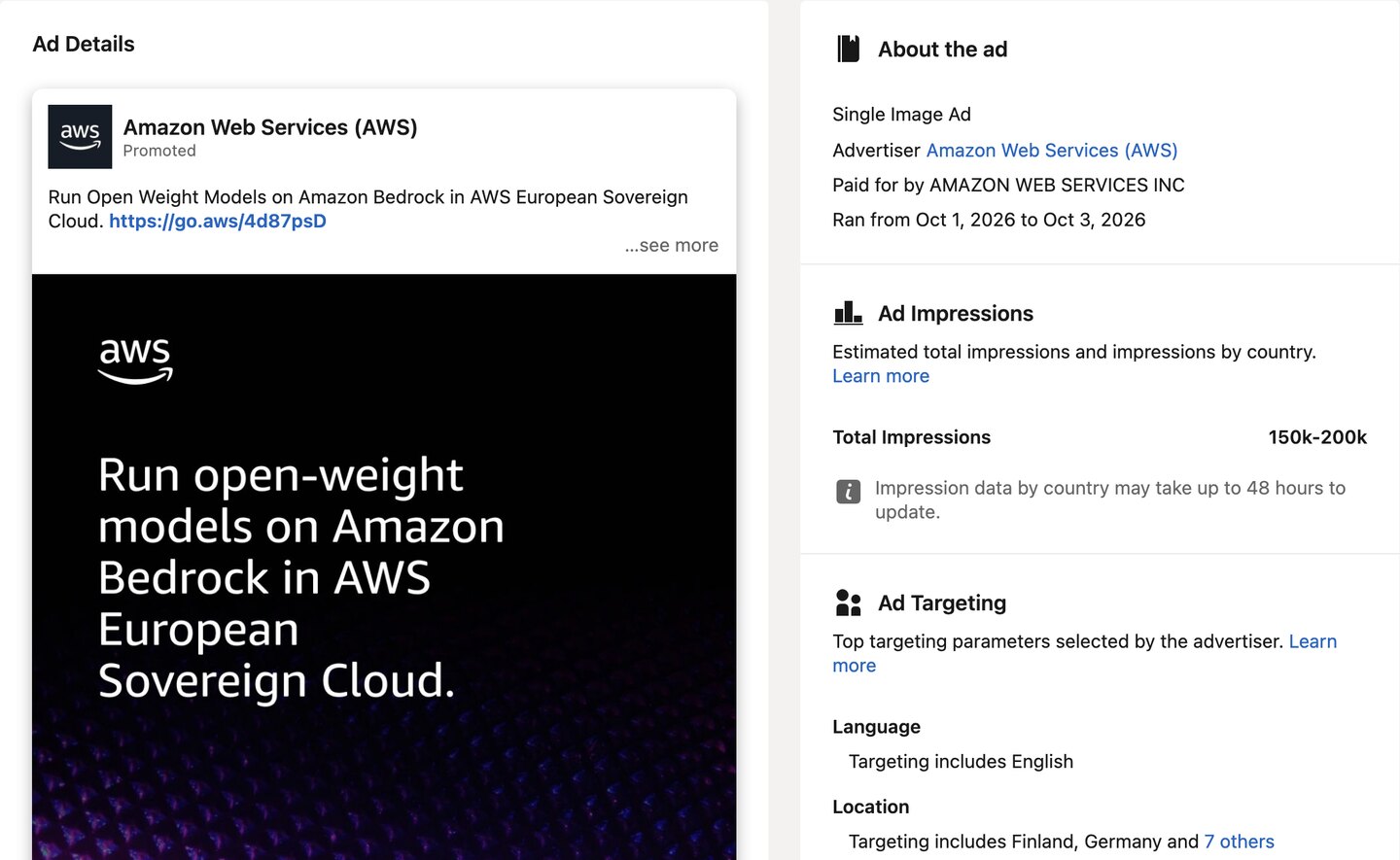
Ads aimed at the EU add run dates, an impression range, a split by country and the main targeting choices (LinkedIn Help). Other ads do not.
How to search the LinkedIn Ad Library
-
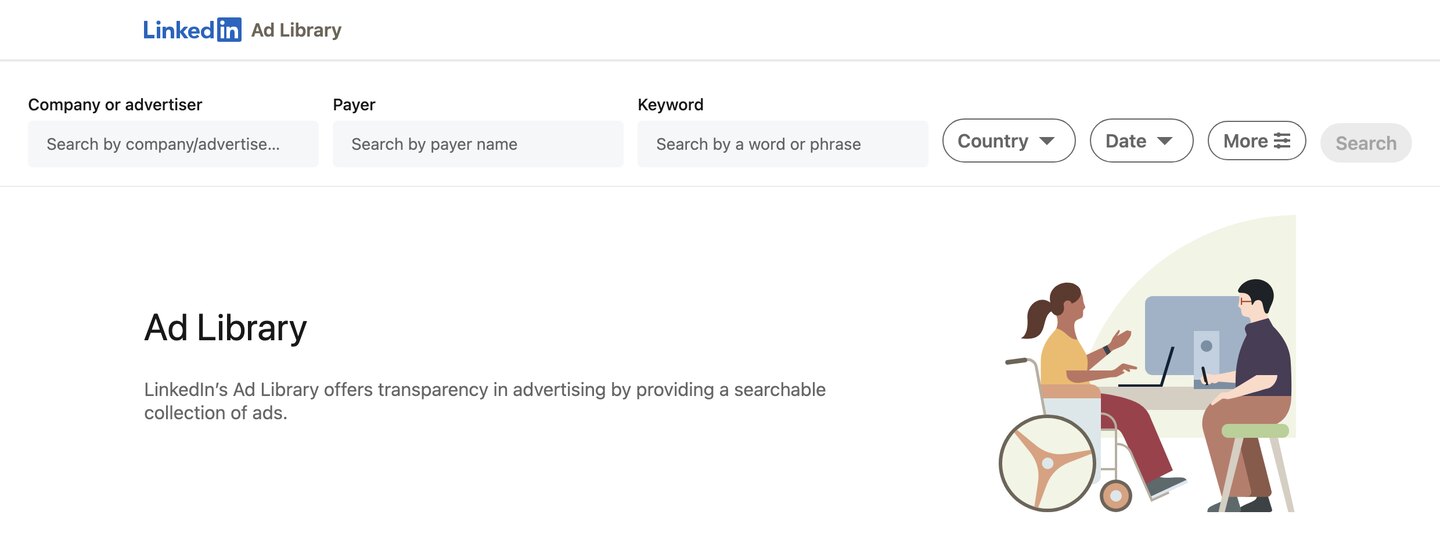
Open the library
Go to linkedin.com/ad-library. A company's LinkedIn Page also links there: in May 2024 LinkedIn began swapping the Page's old Ads filter for that link (LinkedIn Help).
-
Search by company name
Type the brand into the company or advertiser field. It is the obvious route and the narrowest one: it shows what one competitor is saying right now.
-
Run the payer search too
LinkedIn records who paid for an ad apart from the Page it ran on. When an agency or a parent company buys, a brand search misses those ads. This is the step people skip.
-
Search by keyword
A category term shows how the whole market argues its case. It also turns up competitors you did not know were bidding for the same buyers.
-
Filter by country and date
Narrow the results to the markets you sell in and the months you care about. Pick an EU country to get ads that carry run dates and impressions.
-
Open an ad and read its page
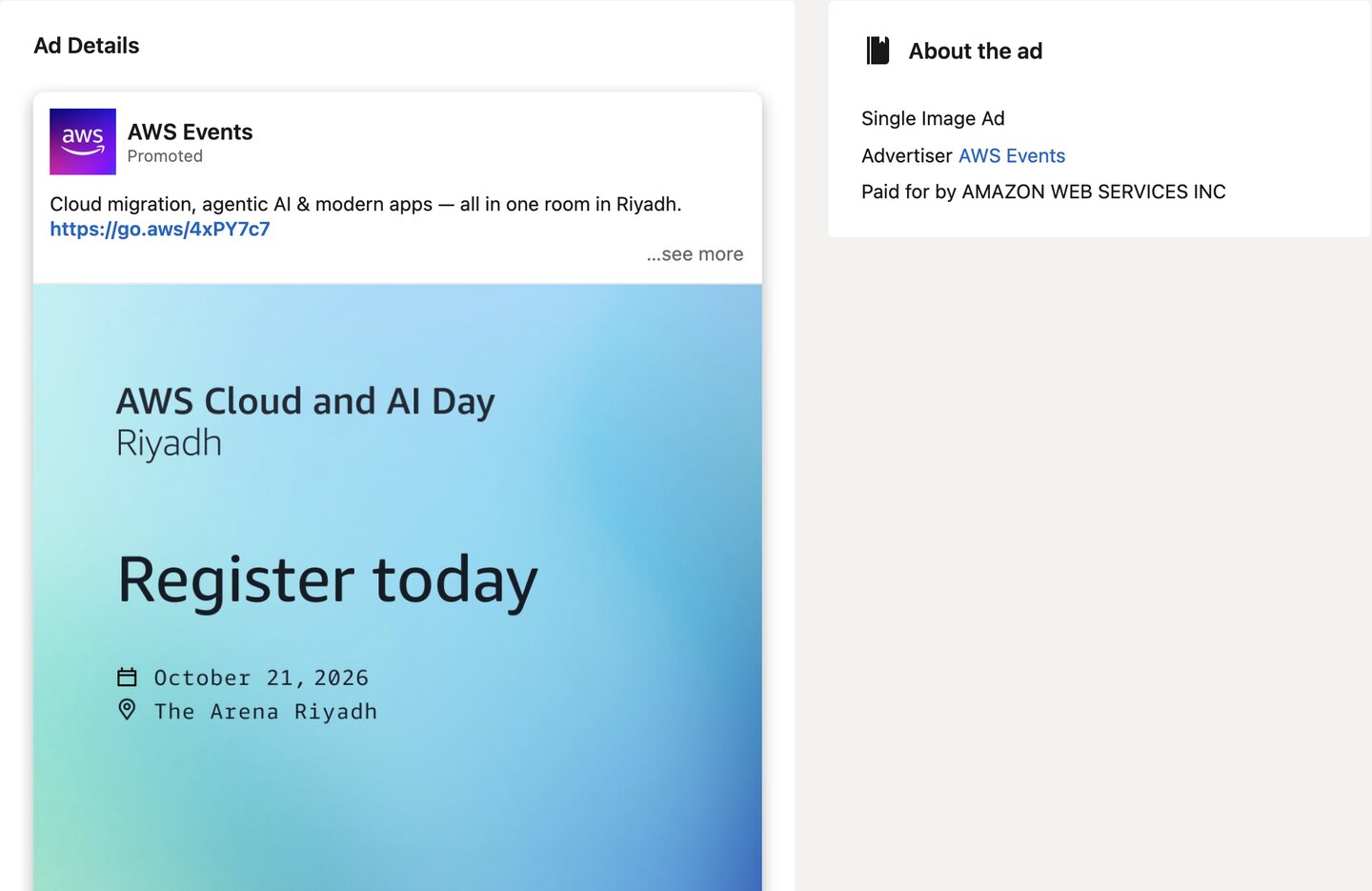
An EU-targeted ad shows when it ran, its impressions and its targeting. Any other ad shows only the creative, format, advertiser and payer, as the two AWS ads below show.
What the Ad Library will not tell you
The LinkedIn Ad Library shows no performance data. LinkedIn reports no spend, no click-through rate and no conversion data for any advertiser anywhere in the tool. Outside the EU there are no run dates or impression ranges either. Any product promising you exact competitor numbers is modelling them, not measuring them. Where dates exist, how long an ad has stayed in market is the best signal you get.
The second gap is restricted ads. For those, LinkedIn does not show the ad preview, the advertiser name or the payer name (LinkedIn Help), so a regulated category looks emptier than it is. Add the one-year retention rule and an empty search never proves a competitor is not advertising. It only proves you cannot see it.
Turning a competitor's LinkedIn ads into your own angles
-
Read the first line, not the design
The opening line names who the ad is for and what it claims. Design is the least transferable part of a competitor ad and the most tempting to copy.
-
Record the claim, the objection and the proof
For each ad worth keeping, write what it claims, which buyer objection the claim answers and what proof it offers. Three lines per ad.
-
Weigh the longest-running ads more, where dates exist
On EU-targeted ads, run length is the best signal the library gives you. Five competitors running the same argument for months is a market telling you something.
-
Rewrite the argument in your own product truth
The output is never a copied ad. It is the objection the market answers, rewritten against what your product can prove. Copy the argument, never the execution.
Is there a LinkedIn Ad Library API?
Yes. LinkedIn runs a LinkedIn Ad Library API, but it is not self-serve. It is a vetted product: you create a LinkedIn Page for your company and a developer app in the LinkedIn Developer Portal, request the Ad Library product from the app's Products tab and fill in an access form. Once LinkedIn grants it, calls need a member's OAuth token.
The API returns the same public data as the library: the advertiser, the ad format and the creative, plus impressions, targeting and run dates for ads aimed at the EU. You search it by keyword, advertiser, target country and date range. It covers ads from 1 June 2023, keeps each ad for one year after its last impression, and new ads usually appear within 24 to 48 hours (LinkedIn Ad Library API).
LinkedIn says the API is meant for research and non-commercial use, and it caps how many requests you can make.
Three ways this library will mislead you
An empty result is not proof of anything
Between the June 2023 start date, the one-year retention rule and restricted ads with no preview or advertiser name, a competitor can be advertising heavily and still look absent. Absence means you cannot see it, never that it is not happening.
Searching the brand misses whatever an agency bought
LinkedIn records the payer apart from the Page the ad ran on. If an agency, a parent company or a regional entity is buying, a company-name search returns a fraction of the ads. Run the payer search too.
A long-running ad is not automatically a good ad
Run length is the best signal available, and it is still weak on its own. You also see it only on EU-targeted ads. Large advertisers leave brand campaigns running for reasons that have nothing to do with results. Five competitors converging on one argument is evidence; one brand repeating itself is not.
LinkedIn Ad Library: FAQ
Is the LinkedIn Ad Library free?
How far back does the LinkedIn Ad Library go?
Can I see how much a competitor spent on LinkedIn ads?
Can I see how long a LinkedIn ad has been running?
Does the LinkedIn Ad Library show paused or ended ads?
Why can't I find a competitor I know advertises on LinkedIn?
Is there a LinkedIn Ad Library API?
What's the difference between the LinkedIn Ad Library and a paid ad spy tool?
What should I record from each ad?
Turn their ads into yours
The LinkedIn Ad Library shows what your market argues. It cannot tell you what your own buyers care about, because every ad in it was written for someone else's customers. Selzee scans your brand's public evidence and your competitors, and turns it into your first finished ads for your brand.
Turn their ads into yoursKeep exploring
The Meta, Google, LinkedIn and TikTok libraries, and what each one will not show you.
Nineteen real LinkedIn ads, each with its hook and the pattern behind it.
How ecommerce teams read a competitor's ads and turn them into angles.
Nine ad spy tools compared on price, free plan and what each one shows.