Every route, ranked

Meta Ad Library: How to Find and Read Competitor Ads

Nine routes to a competitor's ads, in the order worth trying, with what each one actually returns and what it will not show you. Four are public libraries and a tool below opens all four at once. Four more need no library and no subscription. The ninth costs money, and is worth it for two specific reasons. Real ads first, because that is what you came for.

One Advertiser, Four Jobs, One Week

Every one of these is a live Quince ad, pulled out of the Meta Ad Library the day this page was written, and every card links the original. Read them together rather than one at a time: the same brand is explaining its business model, attacking a competitor's sale, selling a category you were not looking for, and talking to a completely different buyer. Search for the sweater and you find one of the four.

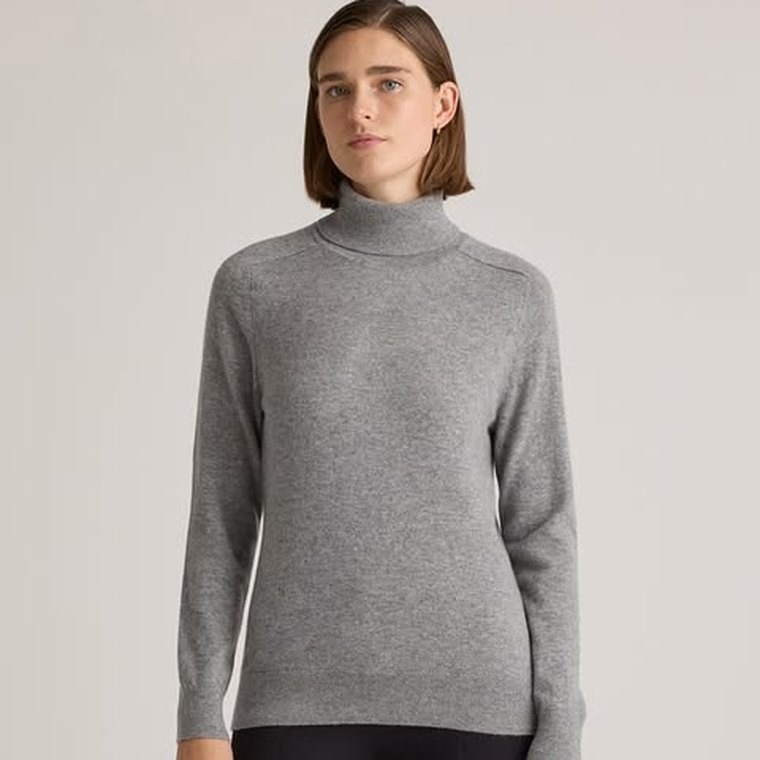
A Quince ad: a woman in a grey cashmere turtleneck against a plain background
Quince facebook

Explains the business model

Ever wonder why luxury products are so expensive?

A question, then the mechanism: it names the factories that make for luxury brands and says it sells from them directly. This is the only one of the four that argues with a reason rather than a price, and it is the one worth stealing the structure of.

See it in the Meta Ad Library
A Quince ad: a woman in a black cashmere V-neck sweater against a plain background
Quince facebook

Attacks a competitor sale

Competitors marked it down. We never marked it up.

Same brand, same week, and the picture is almost the card beside it: a woman, a plain ground, a sweater. Only the line changed, and it went from explaining a model to attacking somebody else's discount. Creative that looks identical can be doing opposite jobs.

See it in the Meta Ad Library
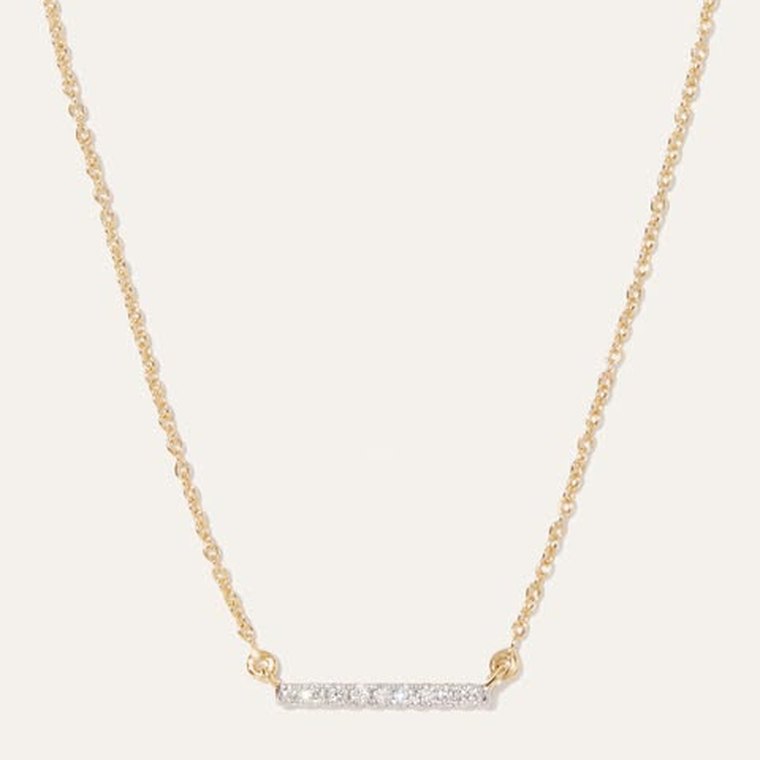
A Quince ad: a gold chain necklace with a small diamond bar pendant on a cream background
Quince facebook

A category you were not searching

Everyday luxury for everyone.

The same brand line over 14K gold jewellery. Search this advertiser for "cashmere" and this ad does not exist for you, which is exactly why step two of the method below is to search the advertiser and not the product.

See it in the Meta Ad Library
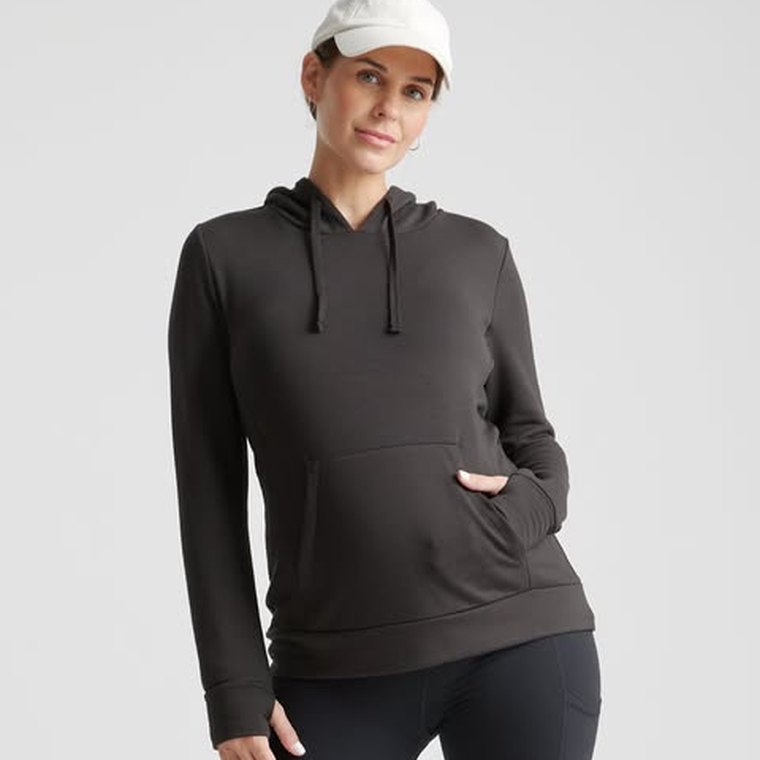
A Quince ad: a pregnant woman in a dark hooded sweatshirt and a white cap
Quince facebook

A different audience, running longest

Everyday luxury for everyone.

Maternity and nursing, and it started in December while the other three started in July. Longevity is the only performance signal any library gives you, so the oldest ad in a competitor's set is the one to read first.

See it in the Meta Ad Library

Routes 1 to 4: The Public Libraries

Every platform that matters publishes one, all four are free and none needs an account with the brand you are researching. They do not work the same way, and the difference is where most guides on this are wrong.

Route 1 · Meta

Meta Ad Library

The deepest and the most global: every ad currently running across Facebook, Instagram, Messenger and the Audience Network, no login. The catch nobody states: it matches the WORDS in the ad, not the advertiser. Searching one sportswear brand returned Planet Fitness and an unrelated Shopify page on the first screen. Click the advertiser on a card to narrow it to one, and remember that outside the EU and the UK a paused ad is gone for good.

Route 2 · Google

Ads Transparency Center

Search, YouTube, Display and Shopping, with a date range that shows how long a message has been in market. It matches the destination WEBSITE, so a brand name on its own returns nothing and the domain returns thousands. One domain often covers several advertiser accounts, so filter by advertiser once you are in or you will read two brands as one.

Route 3 · LinkedIn

LinkedIn Ad Library

Use the "Company or advertiser" field, not the keyword field. On a real brand the keyword search returned 289 ads and not one of them belonged to that brand; the advertiser search returned five and all of them did. Expect recruitment ads in the mix, because on LinkedIn a consumer brand usually spends more on hiring than on selling.

Route 4 · TikTok

Two surfaces, one archive

The Commercial Content Library searches a named advertiser and publishes reach and targeting bands nobody else does, but it exists to satisfy the EU Digital Services Act, so it holds ads shown in the EU, the EEA, the UK, Switzerland and Türkiye and nothing else. A US advertiser search there returns zero whatever they are spending. Everywhere else the Creative Center is what you have: top ads by industry and region, which answers what wins in the category.

Where to Find Each One

All of them open in a browser with no login: the Meta Ad Library, the Google Ads Transparency Center, the LinkedIn Ad Library, and on TikTok either the Commercial Content Library if you sell into Europe or the Creative Center if you do not. Bookmark the two your competitors actually use rather than working all four every month, because coverage you do not maintain is worse than coverage you never started: it gives you a stale picture you still trust.

Shortcut: Open the Four Libraries at Once

Routes one to four above are the public libraries, and each wants a different thing: Google wants the website, LinkedIn wants the advertiser, TikTok wants a country it actually covers. Type the competitor once here and it builds all four links correctly, and says which of them narrow to that advertiser and which are only a search.

Free forever No login Nothing uploaded

Who are you researching?

Google matches the website, not the name.

Libraries are filtered by where the ad ran, not where the company is.

Routes 5 to 8: No Library, No Subscription

  1. 5

    Search Google the way their buyer would

    Their live search ads are sitting in a normal results page. Type the query a buyer would use, not the brand name, and read the sponsored block: who is bidding, what headline they lead with, which extension they pay for. The searches that brought you to this page carry four bought ads for exactly this job, which is how we know the intent converts for somebody.

  2. 6

    Trigger their retargeting on purpose

    Visit the competitor, browse a category, add something to a basket and leave it. Their retargeting will find you within a day or two, and retargeting creative is usually the sharpest work a brand runs because it is aimed at somebody who already wants the thing. Use a browser you do not mind polluting, and give it a week before you conclude they do not retarget.

  3. 7

    Open the ad-targeting panel on an ad you were served

    When a competitor ad reaches you on Facebook or Instagram, the menu on the ad itself explains why. It names the advertiser and the broad reason you were selected, which is the only place any platform tells you anything about who an ad was aimed at. It is one data point rather than a dataset, and it is the only free window into targeting rather than creative.

  4. 8

    The two companion tools beside Meta's search box

    The Ad Library Report covers spending totals by advertiser and location, but only for social issue, electoral and political advertising, so it says nothing about an ordinary commercial advertiser. The Ad Library API is the same public data programmatically, which is the route once you are tracking more competitors than a browser tab can hold. Neither publishes spend for a normal brand, because Meta does not collect that disclosure outside politics.

Route 9: When a Paid Tool Is Worth It

The paid tier sells three things the free routes cannot give you: history on ads that have stopped, alerting so you find out without remembering to look, and one search across platforms instead of four tabs. That is worth paying for when you track many competitors continuously, and hard to justify when you check five brands once a month, because the underlying creative is the same public data either way. Anything promising a competitor's exact spend, click-through rate or return on ad spend is modelling it, not measuring it.

One Route We Could Not Get Working

Google's Ad Preview and Diagnosis Tool is the one route on this page we cannot vouch for. It offers to preview a results page for any search term, location and device, which would be an excellent way to see a competitor's search ads in a market you are not in. Signed out it would not run a search for us on 2026-09-16, so treat it as a route that needs a Google Ads account rather than a free one. Inside your own account, Auction Insights does the related job properly: it names the advertisers appearing alongside your own search ads, which is the only list of your real paid competitors that exists anywhere.

Key takeaways

  • Eight of the nine routes are free, and the four public libraries do not work alike: Meta matches the words in the ad, Google matches the website, LinkedIn wants the advertiser field, and TikTok only archives European markets.
  • Ad libraries show what is running, never what is working. Longevity is the only performance proxy they give you, which makes an ad that has been live for months the most valuable thing in the interface.
  • The reusable output is the argument, not the execution: the claim, the objection it answers, the proof, and the audience. Cross-check the gaps against your own reviews before you test.

Why You Can See Competitor Ads for Free

Ad libraries exist because of regulation, not generosity. Meta launched what was then the Facebook Ad Library in 2018 under pressure over political-advertising transparency, then extended it to cover all advertising, and Meta's own documentation now describes it as a searchable collection of all ads currently running across its technologies. The side effect is that any brand can see any competitor's live creative without a subscription, an account, or a relationship. That is a genuinely unusual state of affairs in a competitive market, and most ecommerce teams still use it as a mood board.

It matters because the creative is where paid performance is decided. Nielsen's 2017 creative-effectiveness research credits creative, not targeting or media spend, with up to 89% of a digital ad's in-market success, and broad targeting has only pushed more of the qualifying job into the ad itself. Knowing which arguments your market is already making, and which it is not, is therefore competitive intelligence about the highest-leverage variable you control. Mirella Crespi, CEO of Creative Milkshake, describes the step that separates browsing from research: “There is a method to the madness of actually looking through creatives, taking those learnings from your competitor's research, and then turning it into something that you can actually execute. This is what we call the creative analysis stage of research.”

What the Meta Ad Library Actually Covers

It is the deepest of the four and the one most research starts with. Meta publishes every ad currently running across its technologies, which means Facebook, Instagram, Messenger and the Audience Network, searchable by advertiser or by keyword, with no login and no advertising account. An ad appears within 24 hours of its first impression, and edits show up on the same clock.

The part almost every guide skips is what happens when an ad stops. "Currently running" is the whole commercial archive: history is kept only for ads about social issues, elections or politics, which stay for seven years, for ads that ran anywhere in the EU in the past year, and for ads that ran in the UK in the past year from 1 July 2025. So outside the EU and the UK, a competitor's paused campaign is simply gone. If an ad matters to your research, screenshot it the day you find it, because there is no retrieving it later.

Two companion tools sit beside the search box and are worth knowing about. The Ad Library Report covers spending totals by advertiser and location, but only for social issue, electoral and political advertising. The Ad Library API is the same data programmatically, for anyone tracking more competitors than a browser tab can hold. Neither publishes spend for an ordinary commercial advertiser, because Meta does not collect that disclosure outside politics.

How to Research Competitor Ads, Step by Step

  1. 1

    Build a real competitor list first

    Not the three brands your team names in a meeting. Include the two that outrank you in search, the one your reviews keep mentioning by name, and the cheap alternative buyers compare you against. Reviews are the best source here, because customers name the competitor they left in their own words.

  2. 2

    Search by advertiser, then by keyword

    Searching a brand shows you what one competitor argues. Searching a category term shows you what the whole market argues, including brands you did not know were bidding against you for attention. Do both, in that order, because the second one is where the surprises are.

  3. 3

    Filter to what has been running longest

    Ad libraries publish start dates. An ad that has been live for four months in a competitive category is the single most useful signal available to you, because nobody keeps paying for a creative that loses. Sort by longevity and you have a shortlist of proven arguments without any performance data at all.

  4. 4

    Record the argument, not the layout

    For each ad worth keeping, write down four things: the claim it makes, the objection it answers, the proof it offers, and who it is clearly talking to. That is the reusable part. The font, the colour grade, and the transition are not.

  5. 5

    Map the claims against each other

    Lay every competitor claim side by side and the gaps appear immediately: the objection nobody is answering, the segment nobody is addressing, the proof type everybody leans on so heavily that it has stopped being differentiating. Those gaps are your angles.

  6. 6

    Check the gap against your own customers

    An unclaimed angle is only worth testing if your buyers actually care about it. Cross-reference the gap with your reviews and comments. If the objection nobody answers is also the objection your customers raise, you have found the test worth running this week.

Four tabs open, nothing written down. That is browsing, not research.

The libraries hand you what a competitor is running. The claim, the objection it answers, the proof and the audience are the parts you can reuse, and none of them survive a folder of screenshots.

The Limit Every Ad Library Shares

No public ad library publishes performance. You cannot see spend, click-through rate, cost per acquisition, or return on ad spend for anyone else's creative, and any tool claiming to show you a competitor's exact numbers is modelling, not measuring. This is the single most important thing to internalise, because it changes how you read the interface: a competitor ad is a hypothesis somebody else is funding, not a proven winner. The one real signal available is time. Platforms publish start dates, and an ad still running after months in a competitive category has almost certainly earned its place, because no team keeps paying to serve a loser. Sort by longevity, treat everything launched in the last few weeks as an experiment rather than a conclusion, and you extract most of the available value without pretending to data nobody has.

Six Ways Competitor Ad Research Goes Wrong

  • Copying the execution instead of the argument

    Fix: rebuild the claim in your own brand and product truth. A competitor's hook works because of their proof and their audience. Cloning their layout gives you neither.

  • Assuming a visible ad is a winning ad

    Fix: ad libraries show what is running, never what is working. Longevity is the only performance proxy available, so weight by how long an ad has been live and treat everything recent as unproven.

  • Researching once and calling it a quarter

    Fix: check monthly. Competitor messaging shifts with their own testing cycle, and a quarterly audit reads a market that has already moved on.

  • Only looking at the direct competitors

    Fix: include the adjacent category and the cheap alternative. Buyers compare across those lines even when your positioning deck does not.

  • Collecting screenshots nobody revisits

    Fix: a folder of images is not research. Write the claim, objection, proof, and audience next to each one, or the work is unusable within a fortnight.

  • Skipping the customer cross-check

    Fix: an angle your competitors ignore might be ignored for a good reason. Validate against your own reviews before you spend production budget on it.

From Ad Library to a Brief You Can Actually Run

Competitor research answers half the question. It tells you which arguments are already in market and which are unclaimed. It cannot tell you whether an unclaimed argument is unclaimed because it is valuable or because it does not work, and that answer only lives in your own customer evidence. The teams that get value from ad libraries are the ones that treat a gap as a hypothesis and then test it against what their buyers already say in reviews, comments, and support tickets.

Selzee is built for that second half. It reads your reviews and comments, surfaces the objections and outcomes customers raise unprompted, and returns the hooks and briefs worth testing with the customer sentence behind each one attached. Pair it with an hour in the Meta Ad Library and you get the full picture: what the market is arguing, what it is ignoring, and which of those gaps your own buyers care about. If you want to see that done on your own brand before reading the rest of this page, start free and hand it one competitor. The structured version of the competitor side is on competitor ads analysis, the paid-tool landscape is compared on the best Facebook ads spy tools, and the research workflow itself is on AI for advertising.

Finding Competitor Ads: FAQ

01 What is a business ad library? +

A business ad library is a free, public database of the ads a company is currently running on a given platform. Meta, TikTok, Google, and LinkedIn each publish one. They exist largely because of advertising-transparency regulation, and the practical effect is that any brand can see any competitor's live creative without an account or a subscription.

02 Is the Meta Ad Library free? +

Yes, and it needs no login. The same is true of TikTok's Creative Center and the Google Ads Transparency Center. Paid spy tools layer search, alerting, and saved boards on top of the same public data, which is worth paying for when you are tracking many competitors continuously and hard to justify when you are checking five brands once a month.

03 Why does the Google library need a website instead of a brand name? +

The Ads Transparency Center matches on the destination domain rather than the advertiser name. Searching a bare brand name returns nothing and searching its domain returns everything, which is why the finder above asks for the website separately. One domain can also cover several advertiser accounts, so filter by advertiser once you are inside or you will read two brands as one.

04 Why can I not find a US brand in TikTok's ad library? +

Because it is not there. TikTok's Commercial Content Library exists to satisfy the EU Digital Services Act, so it archives ads shown in the EU, the EEA, the UK, Switzerland and Türkiye and nowhere else. A US advertiser search returns zero results whatever they are spending. Outside those regions TikTok publishes no advertiser archive at all, so the finder opens the Creative Center's Top Ads instead, which shows what wins in a category rather than what one brand runs.

05 Can I see how well a competitor's ad is performing? +

No. No public ad library publishes spend, click-through rate, or return on ad spend for another advertiser, and any tool promising exact competitor numbers is modelling rather than measuring. The one real signal is time: an ad still running after several months in a competitive category has almost certainly earned its place.

06 How often should I check competitor ad libraries? +

Monthly. Competitor messaging moves with their own testing cycle, so a quarterly audit describes a market that has already shifted. A focused thirty minutes each month on the two platforms where your competitors actually spend beats an exhaustive sweep once a quarter.

07 What should I record from each competitor ad? +

Four things: the claim it makes, the objection it answers, the proof it offers, and who it is talking to. That is the transferable part. Saving screenshots without those notes produces a folder nobody reopens, and the fonts and transitions you were tempted to copy are the least useful thing in the ad.

08 Is it legal to research competitor ads this way? +

Yes. These libraries are published deliberately by the platforms as transparency tools, and the ads in them are already public. Copying a competitor's creative assets or trademarked material is a different matter entirely, which is why the useful output of this work is the argument rewritten in your own product truth rather than the execution.

09 How does Selzee fit into competitor ad research? +

Ad libraries tell you what the market argues. Selzee tells you what your buyers care about, by reading your reviews, comments, and campaign data and returning the hooks and briefs worth testing with the customer language attached. The gap between those two answers is where your next winning angle usually sits.

Bring a competitor you cannot out-argue and a set of your own reviews. Selzee reads both and comes back with the objection they are leaving unanswered, the customer language that answers it, and the briefs worth testing this week.

Start free and find the gap

Keep exploring: competitor ads analysis, the best ad intelligence tools compared, the Outdoor Voices ads teardown, the best Facebook ads spy tools compared, the competitor advertising analysis framework, trending ads, AI for advertising.

ask ai about selzee

© 2026 Selzee. All rights reserved.