 Add to Chrome
 Facebook Ad Mockup Generator (FREE TOOL)
Drop a picture and see it as a real Facebook feed ad: page name, primary text, headline, button and reactions, light or dark. Download a 1080 wide PNG. Nothing is uploaded.
Upload picture
Shape
Edit the ad

Built and checked by Marián Cabadaj. Last checked October 2026.
What the sizes here come from
Meta's Facebook Feed ads guide for 4:5 at 1440 x 1800, primary text of 50 to 150 characters, a 27 character headline and the button labels.
Meta Business Help Center, aspect ratios by placement for the shapes Facebook Feed takes: 1:1 and 1.91:1 beside 4:5. The 1440 x 1440 and 1440 x 754 sizes are those ratios at the 1440 width.
The examples on this page were made by the same code the tool runs.
The short answer
- A Facebook ad mockup is a picture of your ad as it shows in the Facebook feed: the page name with "Sponsored", the primary text, the picture, the headline with its button, and the reactions. You use it to check or show an ad before you pay for it.
- For a Facebook Feed image ad, Meta recommends a 4:5 picture at 1440 x 1800 pixels, primary text of 50 to 150 characters and a headline of 27 characters (Meta's Facebook Feed ads guide).
- Facebook Feed also takes 1:1 and 1.91:1 pictures (Meta Business Help Center). This generator draws all three shapes, in light or dark mode, and downloads a 1080 wide PNG.
- Nothing is uploaded. The picture stays in your browser, and you need no account.
Our articles are still written by HUMANS! Get human written articles in your Google feed.
Add as preferred sourceSix Facebook ad mockups made with this tool
Six ads from the Selzee gallery, dropped into the generator and saved with Download. They show all three shapes, light and dark mode, and three buttons: Shop now, Learn more and Get quote.
One ad in the three feed shapes
The same picture as a 4:5, a 1:1 and a 1.91:1 ad. The shape decides what the crop keeps.
Facebook feed ad sizes the mockup uses
The PNG is always 1080 pixels wide. The picture inside it keeps the shape of the file Meta asks for.
| Picture file in pixels | Use it for | |
|---|---|---|
| 4:5 | 1440 x 1800 | Meta's recommended shape for a Facebook Feed image ad. It is the tallest picture the feed shows, so it takes the most room on a phone. |
| 1:1 | 1440 x 1440 | A square. Safe when one file must run in many places, but shorter than 4:5 in the feed. |
| 1.91:1 | 1440 x 754 | The wide shape. Small on a phone, so keep text and faces in the middle. |
Sources: Meta's Facebook Feed ads guide (4:5 at 1440 x 1800, a minimum width of 600 pixels, JPG or PNG up to 30 MB) and Meta Business Help Center (Facebook Feed takes 1.91:1, 16:9, 1:1 and 4:5). The 1:1 and 1.91:1 sizes are those ratios at the same 1440 width. To cut a picture to one of these sizes first, use the Facebook image resizer. Verified 2026-10-21.
The parts of a Facebook feed ad
Every part the generator draws, where it sits, and what to check before the ad runs.
| Where it sits | What to check | |
|---|---|---|
| Page name and "Sponsored" | The top row, with your profile picture | Use your real page name and logo. A blank circle reads as a template. |
| Primary text | Above the picture | Meta suggests 50 to 150 characters. Long text is cut with "See more", so the first line has to work alone. |
| Picture | Full width, under the text | 4:5 is Meta's pick for the feed. 1:1 and 1.91:1 also run. |
| Headline | In the bar under the picture | Meta suggests 27 characters. A long headline is cut on one line. |
| Description and website | Above and under the headline, in grey | Keep them short. They sit in small grey text. |
| Button | Right side of the bar | Pick the label from Meta's list: Shop now, Learn more, Sign up, Get quote and more. |
| Reactions, comments, shares | Under the bar | Real counts come from viewers. In a mockup, use numbers your page really gets. |
Text lengths and button labels: Meta's Facebook Feed ads guide. Verified 2026-10-21.
Light or dark: one ad in both modes
The same ad in both feeds. A picture with a dark edge can melt into the dark feed.
What a Facebook ad mockup is for
A mockup answers one question before you spend: does this ad look right in the feed? A loose picture on a white page does not tell you that. The same picture under a page name, with the text above it and a button under it, does.
- Client approval: send the ad as it will look, not a loose file, and get a yes or a change in one round.
- Ad review before launch: check the picture, the first line of text, the headline and the button together.
- Pitch decks: put a planned ad on a slide so the room sees the idea in the feed.
- Portfolio and case studies: show the ads you made in the place they ran.
- Creative tests: compare two pictures or two headlines side by side before you pick one.
How to make a Facebook ad mockup
-
Drop your picture
Choose a file, drag it onto the box or paste a screenshot. Your browser reads it. It is never uploaded.
-
Pick the shape and the mode
Choose 4:5, 1:1 or 1.91:1, then Light or Dark. Drag the picture to choose what the crop keeps.
-
Edit the ad and download
Open Edit the ad for the page name, text, headline, button and counts. Then download a 1080 wide PNG.
How to make a Facebook ad mockup look real
-
Use your real page name
A name like Your Brand reads as a template. Your own page reads as an ad.
-
Add your logo
Your logo in the circle does more for realism than any other detail.
-
Write the text you will run
Only the first lines show before "See more", so test the line that has to work.
-
Keep the headline short
Stay near Meta's 27 characters, so the headline fits beside the button.
-
Use believable counts
Pick numbers your page gets. A huge count on a small brand looks fake.
This generator or Meta Creative Hub
Meta Creative Hub builds mockups inside Ads Manager. You make the mockup like an ad, share a link, and after approval you can import it into a real ad (Jon Loomer's Creative Hub walkthrough). Use it when the ad will run from your own ad account.
Use this generator when you need a picture fast and have no ad account at hand: a pitch, a client preview, a portfolio page or a slide. It needs no login, and the PNG is yours to send anywhere.
Who this generator is for
Brands and marketers
Get an ad signed off before it goes into Ads Manager.
Designers and agencies
Present ad work in the feed it was made for.
Freelancers and creators
Show a client a spec ad before the first invoice.
Facebook ad mockup: FAQ
What is a Facebook ad mockup?
How do I make a Facebook ad mockup?
What size is a Facebook ad image?
How long can Facebook ad text be?
Is this Facebook ad mockup generator free?
Is my picture uploaded?
Can I make a Meta ad mockup for Instagram too?
Does the mockup look exactly like Facebook?
How we checked
Last checked: 21 October 2026. The 4:5 size, the text lengths and the button labels come from Meta's Facebook Feed ads guide, and the shapes the feed takes from Meta Business Help Center, both read at the source that day.
On 21 October 2026, we ran the generator on the nine gallery ads on this page and on two test pictures, 1200 x 800 and 1080 x 1350. We made every shape in light and dark mode, with and without text and counts. We ran it in headless Chrome at a laptop width and a phone width.
- The size: every PNG is 1080 wide, and the picture inside it keeps the shape's ratio.
- The crop: the picture fills the frame, centred, and a drag moves it only as far as the picture goes.
- The text: three lines, then "See more". The headline and the description stay on one line each.
- The counts: 1240 reads 1.2K, and the row is left out when every count is zero.
- The privacy: no network request is made with the picture.
Keep exploring
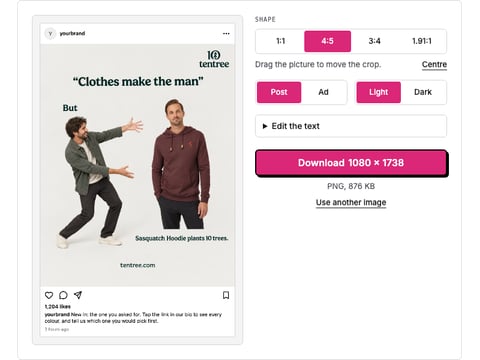
Drop a picture and get a realistic Instagram post or ad mockup: your name, caption, likes, light or dark, 1:1 or 4:5. Download a PNG. Nothing is uploaded.
Free Facebook image resizer. Pick feed, square, link, story or cover, fit the whole photo or crop it, and download a JPG or PNG at the exact size. Nothing is uploaded.
Facebook crops covers differently on desktop and mobile. See both crops and the area that survives them. Nothing is uploaded.
Enter one brand and open all four public ad libraries at the right place, with what each one will and will not show you.
A mockup shows the ad. Selzee makes it.
Drop your URL and Selzee researches your brand, your reviews and the ads working in your market, then makes ads at the right size, in your colours. Free to start, no credit card.
Get started for free