 Add to Chrome
Add Text to GIF (FREE TOOL)
Drop a GIF, type your caption and see it on the first frame as you type. Download the GIF with the text on every frame. It runs in your browser.
Upload GIF
Position
Text size
More options

Built and checked by Marián Cabadaj. Last checked November 2026.
What the facts here come from
GIF89a specification, CompuServe, 1990 for frame delays, color tables and 256 colors per frame.
MDN, CanvasRenderingContext2D.strokeText() for how the outline around each letter is drawn.
Can I email, GIF support for which email apps play an animated GIF.
Meta's Facebook Feed video ads guide for GIF among the file types a Feed video ad takes.
The captioned examples on this page were made by the same code the tool runs, on ads from the Selzee gallery.
The short answer
- This tool draws your caption once and lays it over every frame of the GIF, then writes the GIF again. It keeps the size, the number of frames, each frame's delay and the loop.
- Pick Top, Middle or Bottom, and S, M or L. M is 10% of the GIF's width: 48 px tall letters on a 480 px GIF. A caption too long for its place shrinks until it takes less than half the height.
- White text with a black outline reads on any picture. A light color gets a black outline, a dark color a white one.
- Most email apps play an animated GIF, but Outlook for Windows 2007 to 2019 shows no animation (Can I email). A caption that is on every frame reads in both.
Our articles are still written by HUMANS! Get human written articles in your Google feed.
Add as preferred sourceWhat changes in your GIF, and what stays
Here is what the tool does to each part of the file when it adds the text.
| After the text | Why | |
|---|---|---|
| Size | Stays the same | The text is drawn on a layer the size of the GIF. |
| Frames and delays | Stay the same | Each frame keeps its delay, in hundredths of a second. |
| Loop | Stays the same | A GIF that loops forever still loops; one that plays once still plays once. |
| Transparency | Stays | See-through pixels stay see-through, except under the text. |
| Colors | Up to 256 per frame | The text adds colors, so a frame that already uses 256 gets a new color table. |
Frame delays, color tables and the 256-color limit: GIF89a specification, CompuServe, 1990. The outline is drawn with the canvas stroke the browser provides (MDN, strokeText). Verified 2026-11-15.
How do you write a GIF caption people read?
Many GIFs loop every second or two, so the caption has about that long to land. Keep it to one line of 2 to 6 words. A second line works; a third is a paragraph nobody stops for.
Top or bottom is a choice about order. A caption on top sets up the moment, so the reader sees the words before the motion. A caption at the bottom is the punchline: the motion first, the words after. Middle covers the action, so save it for a GIF where the middle is empty sky or a wall.
Size follows the screen. S (7.5% of the width) suits a GIF that runs large on a landing page. M (10%) suits email and chat. L (14%) suits a GIF someone sees small, in a phone feed.
Leave the outline on unless the picture behind the words is one flat color. A 1-pixel edge of light picture under white text is enough to make it unreadable.
Starting from a phone video? Turn it into a GIF first with our MOV to GIF converter, then add the text here.
Four captions this tool added
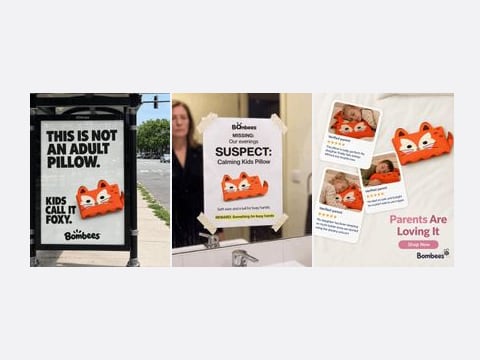
Each is a GIF made from ads in the Selzee gallery, captioned by the converter on this page with its default font and outline. These are the first frames.
How to add text to a GIF
-
Drop the GIF
Choose a GIF, drag it onto the box or paste it. Your browser reads it. It is never uploaded.
-
Type the caption
The text shows on the first frame as you type. Pick Top, Middle or Bottom and S, M or L; color and outline are under More options.
-
Download the GIF
A moment after you stop typing, the whole GIF plays with the text on it. Download it when it looks right.
Why can a captioned GIF look a little different?
Every GIF frame holds at most 256 colors (GIF89a specification). White text with a black outline adds a few colors, plus the soft gray edge of every letter.
When a frame still fits in 256 colors with the text on it, every color stays exactly as it was. When it does not, the tool picks the 256 colors that matter most for that frame and moves each pixel to the nearest one. On a photo GIF that can show as slightly flatter shading; on a cartoon or a screen recording you will not see it.
The file size barely moves. On the four GIFs above, each 870 x 1080 with 2 frames, the captioned file came out within 10% of the original.
Need a still for a thumbnail or a poster frame? Save any frame as PNG or JPG with our GIF to PNG converter. Need the GIF as a video for Reels or TikTok? Use the GIF to MP4 converter.
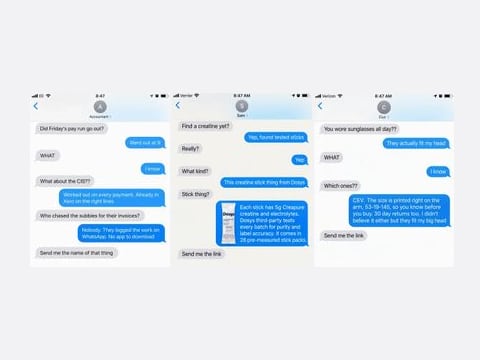
Four Selzee ads where the words do the work
These ads from the Selzee gallery carry their message in the text itself: a comment thread, a billboard, a whiteboard. The same rule holds for a GIF caption: short, high contrast, read in one look.
Add text to GIF: FAQ
How do I add text to a GIF?
How do I add text to a GIF on my iPhone?
Does adding text change the speed of the GIF?
What font does the caption use?
Can I add a caption to a GIF with a transparent background?
Can I post the captioned GIF as a Facebook ad?
Is my GIF uploaded anywhere?
How we checked
Last checked: 15 November 2026. The frame delays and the 256-color limit follow the GIF89a specification; the email support comes from Can I email, read that day. Before we wrote the code, we worked out by hand what each GIF must hold, and read every result back with a separate GIF decoder.
- A 16 x 10 GIF, red for 500 ms then blue for 250 ms, comes back 16 x 10 with 2 frames of 500 and 250 ms and the same loop, and the caption pixels are white on both frames.
- On a 400 x 300 GIF, size M is 40 px; at the top the first baseline sits 51 px down, at the bottom 275 px down.
- A 12-word caption at size L on a 200 x 100 GIF shrinks until its lines take less than 45 px.
- A GIF with see-through pixels keeps them, and each frame clears before the next, so old pixels never show through.
- An empty file, a PNG renamed to .gif and a damaged GIF each get a plain message, and the page keeps working.
Keep exploring
Save a GIF frame as a PNG or a JPG: the first frame, the one you pick, or every frame in a ZIP. Nothing is uploaded.
Turn an iPhone MOV or an MP4 into an animated GIF in your browser: trim it, pick the width and frame rate. Nothing is uploaded.

Free GIF to MP4 converter. Turn a GIF into an H.264 MP4 that Reels and TikTok ads take, with the timing of every frame kept. Nothing is uploaded.
The caption is on. Now the ads.
Selzee finds formats printing money right now and remakes them for your brand. New ads every day. Free to start, no credit card.
Get started for free