Ecommerce AI tools are your secret weapon for automating and fine-tuning the most critical parts of your live Shopify store. This isn't about learning the basics; it's about deploying smart technology to handle everything from customer service chats to predicting which products will fly off the shelves next month—all to drive more sales and make your life easier.
What Do Ecommerce AI Tools Actually Do for Your Store?
You've heard the AI hype, but what does it mean for your store's performance and, more importantly, your bottom line? Let's get right to it. This isn't a futuristic concept; it's about giving your business a crew of hyper-efficient specialists who never sleep.
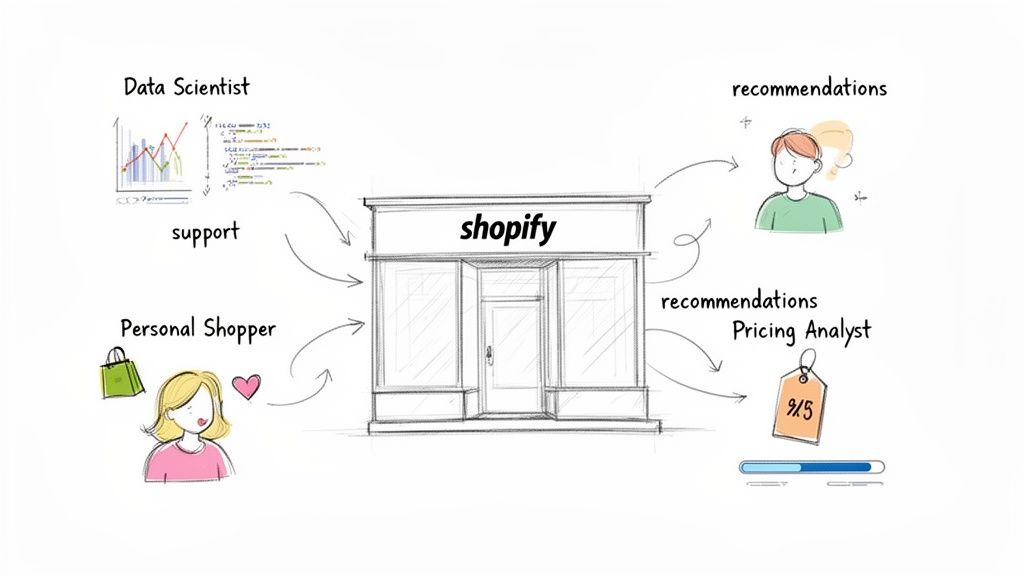
Think of ecommerce AI tools not as a single piece of software, but as hiring an entire expert team without the massive payroll. Each tool has a specific, high-impact job designed to solve the exact operational headaches that are holding you back from truly scaling.
Meet Your New AI-Powered Team Members
Imagine adding these pros to your staff list tomorrow:
The Personal Shopper: This AI watches how a visitor browses your store in real-time and serves up product recommendations so spot-on they feel like a personal suggestion from a friend. The result? Bigger cart sizes and happier customers.
The Data Scientist: This tool is obsessed with your sales data, spotting trends a human could never catch. It can accurately forecast which products you need to reorder before a big sale hits, preventing the dreaded "out of stock" notification that kills revenue.
The Pricing Analyst: This AI keeps a close eye on competitor prices, market demand, and your current stock levels. It then suggests smart price tweaks—or makes them for you—to ensure you're maximizing profit from each sale.
Moving from manual guesswork to data-backed decisions isn't just a "nice-to-have"; it's a fundamental part of staying competitive. In fact, a whopping 51% of ecommerce businesses are already using AI to build better, more personalized shopping experiences. With the global AI ecommerce market expected to hit $22.60 billion by 2032, it's clear these tools are essential for growth. You can discover more insights about AI adoption in ecommerce to see just how fast this is moving.
At its heart, AI's job in your store is to take over the specific, repetitive, and data-heavy tasks that slow humans down. This frees you up to focus on strategy, brand building, and creative marketing—the stuff that only you can do.
To see how these roles translate into real business results, here’s a look at the major AI tool categories and the problems they solve.
Key AI Tool Categories and Their Business Impact
| AI Tool Category | Primary Function | Solves This Problem For You |
|---|---|---|
| Chat Assistants | Automates customer service conversations | Answering common questions 24/7, reducing support tickets, and guiding shoppers to purchase. |
| Recommendation Engines | Personalizes product discovery for each user | "Customers don't know what to buy next," leading to smaller carts and site abandonment. |
| Pricing Optimization | Dynamically adjusts prices based on data | Leaving money on the table with static pricing that doesn't react to market changes. |
| Fraud Detection | Identifies and blocks suspicious transactions | Losing revenue and inventory to chargebacks and fraudulent orders. |
| Inventory Forecasting | Predicts future stock needs and demand | Running out of popular items unexpectedly or overstocking slow-movers. |
Each of these tools tackles a major friction point in the customer journey—from that first click to post-purchase support. By automating the grunt work and delivering sharp, predictive insights, AI becomes the engine that powers higher conversions, better customer loyalty, and serious revenue growth.
The 5 Core AI Tools Your Shopify Store Needs to Scale
It's easy to get overwhelmed by tech talk, but there are really just five key areas where AI makes a massive difference for a live store. Think of these as the five specialists you need on your team to scale your business and crush your goals. We’ll break down exactly what they do, moving past the buzzwords to solve real-world problems.
Each of these tools is designed to tackle a specific—and often frustrating—part of running your business, from turning window shoppers into loyal customers to making sure your hard-earned money stays in your pocket.
1. AI Shopping Assistants and Chatbots
This is where most merchants start, but there’s a massive difference between a basic chatbot and a true AI shopping assistant. Most chatbots are just glorified FAQ pages; they follow a simple script to answer "where's my order?" That's useful, but it doesn't drive sales. An AI shopping assistant is your best salesperson, working 24/7. It doesn’t just answer questions—it starts conversations.
A common mistake is thinking a simple FAQ bot is enough. That costs you money. You need an AI that can:
- Ask smart questions to figure out what a shopper really wants, like, "Are you buying a gift or is this for you?"
- Recommend the perfect products based on that conversation, not just what someone typed into a search bar.
- Sense when a shopper is about to leave the checkout page and proactively offer a discount to seal the deal.
It’s the difference between a signpost and a personal shopper who knows the inventory inside and out.
2. Recommendation Engines
You already see your bestsellers in your Shopify dashboard. A recommendation engine does something far more powerful: it predicts what each individual customer will want to buy next. These aren't your basic "Customers also bought" widgets. This is sophisticated tech that analyzes every click, every pause, and every item added to the cart to create a unique shopping experience for every visitor.
A great recommendation engine is like a personal stylist for every person who visits your site. It shows them exactly what they're looking for—sometimes before they even know it themselves—making bigger, more profitable orders a natural next step.
Imagine a customer adds a dress to their cart. A smart recommendation engine instantly suggests the perfect matching belt and shoes, boosting your Average Order Value (AOV) on the spot. Trying to do that manually is a logistical nightmare.
3. Dynamic Pricing and Optimization Tools
If you set your prices and just hope for the best, you're leaving money on the table. Dynamic pricing tools use AI to adjust your prices in real-time based on competitor stock levels, customer demand, and even the time of day. This isn't about slashing prices; it's about optimizing for profit.
For example, if your biggest competitor runs out of a hot item, the AI can nudge your price up slightly to maximize your margin without scaring off customers. On the flip side, it can automatically create a small, targeted discount for an overstocked product to clear it out. It’s all about making sure you’re priced perfectly at all times.
4. AI-Powered Fraud Detection
For any store doing decent volume, chargebacks are a gut punch. AI fraud detection goes way beyond Shopify's standard risk analysis.
These systems crunch thousands of data points on every single transaction in the blink of an eye. They spot the subtle, suspicious patterns that a human would almost certainly miss—things like weird shipping addresses, mismatched billing info, or a bunch of frantic purchase attempts. By automatically flagging and blocking these sketchy orders, these tools protect your revenue and keep your chargeback rate from spiraling out of control.
5. Inventory and Demand Forecasting
Nothing kills sales momentum faster than your bestseller going out of stock. AI forecasting tools end the guessing game. They analyze your past sales data, seasonal trends, and even market signals to predict future demand with scary accuracy.
This lets you stop reacting to inventory problems and start preventing them. A beauty brand, for instance, can use AI to see the holiday rush coming for a specific gift set and ramp up its supply chain months ahead of time. It turns inventory management from a constant headache into a powerful strategic advantage. To really supercharge these systems, you can check out some free ecommerce tools to help get your product data organized and ready for the AI to work its magic.
Choosing the Right AI Tools for Your Shopify Store
Picking the right AI tool can feel like trying to find a needle in a haystack. The wrong choice isn't just a wasted subscription fee; it's a direct threat to your revenue and customer loyalty. Many Shopify merchants get dazzled by a slick demo, only to end up with a tool that crumbles during a flash sale or won't play nice with their other essential apps.
Your goal here is to find a powerful, long-term asset, not a short-term headache. That means looking past the sales pitch to test these tools against the messy reality of running a busy online store.
Your Battle-Tested Evaluation Checklist
Before pulling out the company card, run every potential AI tool through this gauntlet. A "no" to any of these should be a massive red flag, hinting at future integration nightmares and a disappointing ROI.
1. Does It Natively Integrate with Shopify? This is non-negotiable. A tool that claims "Shopify compatibility" but relies on a clunky, third-party connector like Zapier is a world away from one built with a true, native Shopify integration.
- Look for: A dedicated app right in the Shopify App Store or a direct API that syncs your product catalog, customer data, and order history without a hitch.
- Ask the vendor: "How does your tool handle real-time inventory updates from Shopify during a massive sale?" Their answer will tell you everything.
2. Can It Scale During Peak Traffic? Your AI tool should be your secret weapon on Black Friday, not the first casualty. A lot of platforms cruise along just fine with your everyday traffic, but they buckle under the pressure of a major sales event.
- Look for: Case studies from brands your size or bigger. See who else trusts them when things get crazy.
- Ask the vendor: "What's your uptime guarantee, and how does your system perform when traffic suddenly spikes to 10x our normal volume?"
3. What is the True Total Cost of Ownership (TCO)? That monthly price tag is just the tip of the iceberg. The real cost includes hidden setup fees, pricey training sessions, and—most importantly—the hours your team will burn managing the platform.
The most expensive AI tool is one that requires constant babysitting. If you spend hours every week fixing its mistakes or re-training its models, you haven't bought a solution. You've just given yourself a new, high-maintenance job.
Critical Questions to Ask Vendors
If a tool made it past the initial checklist, it's time to go deeper. These are the questions that separate the genuinely smart platforms from the simple, script-based bots. Asking these will reveal how well a tool will actually adapt to your business.
- "How does your AI learn from my unique store data?" A great AI doesn't just use generic info; it should train on your product descriptions, past customer chats, and sales history to truly get your brand's voice.
- "What level of manual oversight is required after the initial setup?" The right answer is "very little." A solid system should get smarter and more autonomous over time, demanding less of your attention, not more.
- "Can you show me a live example from a store in my industry?" A canned demo is one thing, but seeing the tool working in the wild, in a store similar to yours, is the ultimate proof.
Finally, remember that any AI is only as good as the data you feed it. Clean, well-organized product information is everything. For example, using a product name optimizer to create clear and consistent naming conventions can make a world of difference in how accurately an AI assistant recommends products. To get a broader sense of this, you can even explore the best AI SEO tools and see just how much clean data impacts performance across the board.
How to Implement AI Without Wrecking Your Store
Let's be honest: adding new tech to your live, money-making store feels like performing open-heart surgery. One wrong move could break the checkout, torpedo your conversion rates, and send customers running. But you can bring powerful AI tools into your store without all that chaos. You just need a plan.
The secret is to forget the "big bang" launch. That’s a recipe for disaster. Instead, use a simple, proven 'Crawl, Walk, Run' strategy. This approach lets you test the waters, prove the tool actually works, and gather real data before you bet the farm on it.
This process is all about starting small, making sure it works, and then scaling up once you're confident.
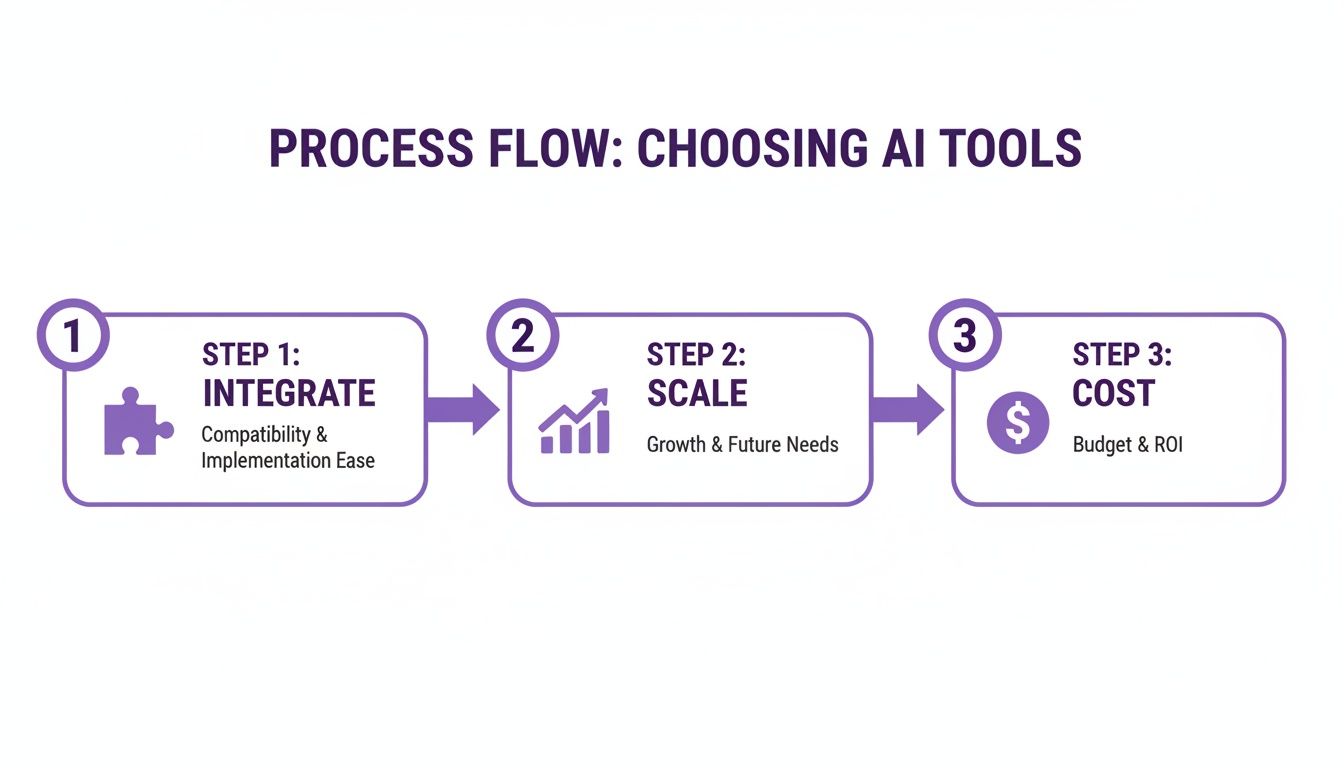
Think of it this way: first, you make sure the puzzle piece fits. Then, you see how it works with the rest of the puzzle. Finally, you admire the finished picture, all while keeping an eye on the cost.
Phase 1: The Crawl (Low-Risk Pilot)
Your first move is a tiny, controlled test. The mission here isn't to revolutionize your business overnight. It's to see the AI in a live environment and collect initial data without risking a thing.
- Your Move: Flip the switch on your new AI assistant on just a few of your top-traffic product pages. I’m talking three to five pages, tops.
- The Goal: Gather intel. How many people are actually talking to it? What questions are they asking? Is it helping or hurting sales on these specific pages?
This limited test is your safety net. If something goes sideways, the damage is contained to a small corner of your store and you can pull the plug in seconds. You're simply kicking the tires.
Phase 2: The Walk (Expand and Train)
Okay, the pilot didn't break anything and the tool seems stable. Now it's time to let it off the leash a little and start teaching it how to be a real part of your team. This is where you shape the AI to fit your brand's unique personality and customer needs.
- Expand the Scope: Roll out the AI tool to an entire product category or across all of your product detail pages.
- Train the Model: This is the fun part. Feed the AI your past customer service chats, your FAQ page, and all your product guides. You're teaching it your language so it can handle the tricky, specific questions that customers throw at you.
- Refine Its Voice: Jump in and review the AI's conversations. Correct any clunky phrases or wrong answers. This feedback loop is what separates a generic chatbot from a genuinely helpful brand expert.
Your goal in the "Walk" phase is to turn a generic piece of software into a specialist that knows your products and customers inside and out. To see what this looks like in the real world, check out how one brand built a specialized AI beauty assistant to give customers hyper-personalized advice.
Phase 3: The Run (Full-Scale Deployment)
You’ve done the work. Your AI is trained, tested, and ready for the big leagues. Now it's time for the final phase: deploying it across your entire site. This is where your new tool stops being an experiment and becomes a core part of your customer experience.
One HUGE pitfall here: Forgetting to train your human team. Your support agents aren't being replaced; they’re getting an AI sidekick. They need to know how to watch over the AI chats, when to intervene, and how to use its data to solve problems even faster.
Key actions for your "Run" phase:
- Go Store-Wide: Unleash the AI assistant on your homepage, collection pages, and even during the checkout process to answer last-minute questions.
- Get Proactive: Turn on the advanced features. Have the AI pop up to help shoppers who seem stuck on a page or proactively offer a discount to someone about to abandon their cart.
- Set Clear Goals: Before you go live everywhere, define what a "win" looks like. Set specific KPIs, like "reduce support ticket volume by 30%" or "increase AOV on AI-assisted sales by 10%."
By following this step-by-step approach, you systematically take the risk out of the equation. Your new AI tool becomes a powerful engine for growth, not a source of late-night technical headaches.
Is Your AI Investment Actually Making You Money?
Let's be real. Pouring money into shiny new ecommerce AI tools without knowing if they're working is like throwing a party and not checking if anyone showed up. If you can't measure the impact, you can't justify the cost. It’s time to stop looking at fluffy numbers like "chatbot interactions" and get down to brass tacks: is this AI actually growing your bottom line?
This isn't about getting lost in a spreadsheet. It's about drawing a straight line from what your AI does to the money in your bank account. You need to know, without a doubt, that your new recommendation engine or AI assistant is delivering a real, tangible return.
The KPIs That Actually Move the Needle
Forget vanity metrics. For a busy store owner, only a handful of key performance indicators (KPIs) truly show the financial impact of your AI tools. To prove its worth, be laser-focused on these four areas.
- AI-Driven Conversion Rate Lift: The big one. Is the AI turning more window shoppers into actual customers?
- Increase in Average Order Value (AOV): Are those AI-powered recommendations and upsells actually convincing people to spend more?
- Reduction in Customer Support Costs: How much time (and payroll) is your AI saving by knocking out common questions, letting your team focus on the tricky stuff?
- Chat-to-Sale Attribution: The holy grail. Can you directly trace a sale back to a conversation with your AI assistant?
When you track these specific outcomes, you’re judging the tool on what it does for your business, not just what it can do.
Crunching the Numbers (The Easy Way)
Okay, let's get practical. Proving ROI comes down to simple math that connects AI performance to real dollars. You don't need a data scientist; your Shopify dashboard and the AI tool's analytics have everything you need.
For example, want to see how that AI recommendation engine is affecting your AOV? The formula is surprisingly simple:
(AOV from AI-Assisted Sales - AOV from Non-Assisted Sales) / AOV from Non-Assisted Sales = % AOV Lift
If that number is positive, you have concrete proof that the tool is making every sale it touches more valuable. The same goes for an AI assistant—just track the revenue it generates through those chat-to-sale conversations.
Why This Matters Now More Than Ever
Getting a handle on these numbers is critical because the world of AI is exploding. The global agentic AI market in retail is predicted to blast off from $60.43 billion in 2026 to a staggering $218.37 billion by 2031. This isn't just a passing fad; it's a massive shift in how we do business, with AI agents starting to handle tasks for both shoppers and sellers.
In fact, by 2028, experts believe about one-third of online retailers will be using advanced AI agents—a huge leap from less than 1% today. You can explore more on the agentic AI market growth here.
This incredible growth means that proving the value of your tools is no longer optional. The merchants who can clearly connect their AI spend to real growth metrics are the ones who will pull ahead of the pack. To get a better grip on one of the most important metrics, you can use a tool to calculate your conversion rate and watch how your AI pushes that number up over time.
By focusing on these solid KPIs, you can confidently prove the value of every single dollar you put into AI, turning it from a simple expense into a powerful engine for profitable growth.
Optimizing Your Content for AI and Shoppers
So, you're ready to bring in powerful AI tools. But before you do, we need to talk about what they eat. Your new AI has a massive appetite, and it feasts on one thing: data.
Think of your recommendation engine or chatbot like a brilliant new employee. They're only as smart as the information you give them. I've seen countless store owners make the costly mistake of investing in incredible AI, only to plug it into a site with messy, incomplete content. The result? Poor performance and a whole lot of wasted potential.
Your product pages are literally the playbook for your AI. If that playbook is vague or confusing, your AI has no idea how to answer a customer's question or make a sharp recommendation that actually drives a sale. The good news is, what works for AI also works for your human shoppers: clear, detailed, and benefit-driven content.
Fueling Your AI with High-Quality Content
Let's get straight to it: high-quality product descriptions are non-negotiable. They are the single source of truth for your AI assistant.
Imagine a customer asks your chatbot, "Is this jacket waterproof enough for heavy rain?" Your AI immediately scans the product description for terms like "waterproof," "rain-resistant," or "DWR coating." If that info isn't there, it can't give a confident answer. And just like that, you've lost a sale. The same logic holds true for your recommendation engine. It can’t suggest a "lightweight, breathable shirt for running" if your descriptions just blandly state "100% polyester."
The bottom line: Rich, descriptive product content directly translates into a smarter, more effective AI. Vague content gets you vague results. It’s that simple.
If you don't want to spend the next few weeks rewriting copy, you can use our generator to create compelling descriptions that feed your AI exactly what it needs to perform.
Structuring Data for Humans and Machines
It’s not just about the words you use, but how you organize them. AI tools love structured information—things like clear bullet points and consistent product titles. They can process that kind of data way more efficiently than a giant, messy block of text.
Here are a few things you can do right now to get your content AI-ready:
Emphasize Benefits in Bullet Points: Don't just list what a product is, explain what it does. For anyone selling on marketplaces like Amazon, our free bullet points tool can help you craft copy that highlights customer benefits, making the value proposition instantly clear to both shoppers and AI.
Standardize Product Naming: A clean, consistent naming convention is a game-changer for product discovery. For example, always using a format like "[Brand] [Product Name] - [Color/Size]" helps AI categorize and compare items with incredible accuracy. If your naming is a bit all over the place, a product name optimizer can help you get it sorted out.
When you start treating your content as the high-octane fuel for your AI engine, you set every tool up for maximum performance and ROI from day one.
Your Top Questions About Ecommerce AI, Answered
Jumping into the world of AI for your online store can feel overwhelming, and you probably have questions. Let's tackle the big ones head-on so you can move forward with confidence.
How Much Do These AI Tools Actually Cost?
The honest answer is: it's all over the map. Most AI tools today use a subscription or pay-as-you-go model tied to usage—think number of chats, recommendations shown, or transactions screened.
A smaller shop might get started with a great AI chat assistant for $50-$200 per month. For bigger brands with tons of traffic, that number can easily climb into the thousands. But here’s the key: don't get stuck on the price tag. Think about the return. If a $300/month tool bumps up your conversion rate by even 5%, it's not a cost; it's an incredible investment.
Is AI Going to Replace My Customer Support Team?
Absolutely not. It's going to make them superstars. The point of AI in support isn't to replace your people; it's to take the repetitive, mind-numbing stuff off their plates—the "Where's my order?" and "What's your return policy?" queries they answer 80% of the time.
Think of it this way: AI handles the boring, high-volume work, freeing up your human experts to focus on the conversations that truly matter. They get to spend their time helping a customer find the perfect gift or sorting out a tricky shipping problem. It's about making your team more powerful, not smaller.
Do I Need to Be a Coding Genius to Set This Up?
Nope. The best ecommerce AI tools are built for merchants, not developers. Platforms in the Shopify App Store are especially good at this, often boiling setup down to a few clicks. In many cases, it's as simple as installing an app and maybe pasting one little snippet of code into your theme.
The real prep work is on your end, with your data. For an AI to give great answers, it needs great information. Making sure your product pages have rich, detailed descriptions is a huge first step. A free product description tool can be a game-changer here, helping you beef up your copy so the AI has everything it needs to shine from day one.
Ready to see how a powerful AI assistant can turn your customer chats into real revenue? Selzee plugs right into your store to automate sales, deliver instant support, and give you the insights you need to grow. Learn more about Selzee and start your journey today.